Metadata is data within the CMS that describes an Asset. Common fields such as title, summary, or keywords provide quick information about the content contained inside of a particular Asset. Metadata that a user enters for Assets can be used for display purposes on site pages.
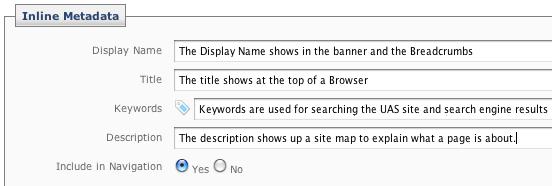
Required metadata shows in the 'Content' Tab in edit mode
- Display Name - the short name of the Assets, distinct from the system name that is displayed on the left hand navigation, on the bread crumbs bar as header1.
- Title - the title of the Asset - this will show at the top or tab of a web browser for that page.
- Keywords - words or phrases about the Asset - this will enable the site search to prioritize this asset in search results.
- Description - the description of the Asset. This descripition is used in search results and helps the user select from mutliple search results.
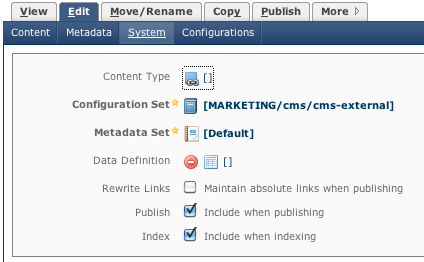
System metadata shows in the 'System' Tab in edit mode
- Include in Indexing - should be checked for pages and files that will be in the general navigation of the site.
- Include in Navigation - should be checked for pages and files that will be in the specific left side navigation of the site.
- Include in Publishing - should be checked for pages and files that will be published to the live server.
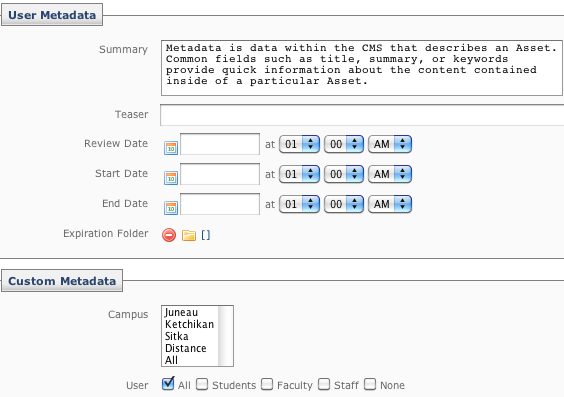
Additional metadata shows in the 'Metadata' Tab in edit mode
- Summary - the synopsis of the Asset
- Teaser - a short enticing phrase about the Asset
- Author - the person or organization responsible for the Asset
- Review Date - the date and time for the content to be reviewed with a respective workflow
- Start Date - the date and time the content should be made public
- Expiration Date - the date and time the content should no longer be made public
- Expiration Folder - the folder the content should be moved to upon reaching the expiration date